
Platform
Kynapt
Our continuous monitoring platform: it discovers your attack surface, retests it all year round and delivers only findings validated by certified pentesters.
Why Kynapt
Your attack surface changes faster than your pentest calendar
A pentest gives you a precise snapshot of one moment. But every week new subdomains appear, services are deployed, vulnerabilities are published and configurations change: what was secure in March may not be in April.
Kynapt covers the time between assessments. It continuously watches the assets you authorized and retests them when something changes. It does not replace a manual pentest: it complements it and shows you where to dig deeper.
The difference from a scanner is judgment: no critical or high finding reaches your team without being reviewed by a certified pentester.
The platform
Three modules, one portal
Discovery, validation and remediation work on the same inventory and stay visible to your team.
01
Attack surface radar
Keep an up-to-date inventory of what your organization exposes to the internet, without relying on spreadsheets.
- Discovers subdomains, web services, APIs, ports and technologies from the domains and IP ranges you approved.
- Classifies every asset by type and criticality: remote access, admin panels and sensitive services first.
- Nothing is tested without authorization: every new asset is reviewed by a pentester before it enters monitoring.
- Your portal shows what is being monitored and when it was last checked.

02
Validation engine
Recurring tests on your authorized assets, and a human filter before anything reaches your team.
- Scheduled scans (daily, weekly or monthly) or on demand, with rate limiting so your operations are not affected.
- Detects vulnerabilities with a published CVE, insecure configurations, exposed services and default credentials.
- Triage removes duplicates and prioritizes; every critical or high finding always goes to a pentester.
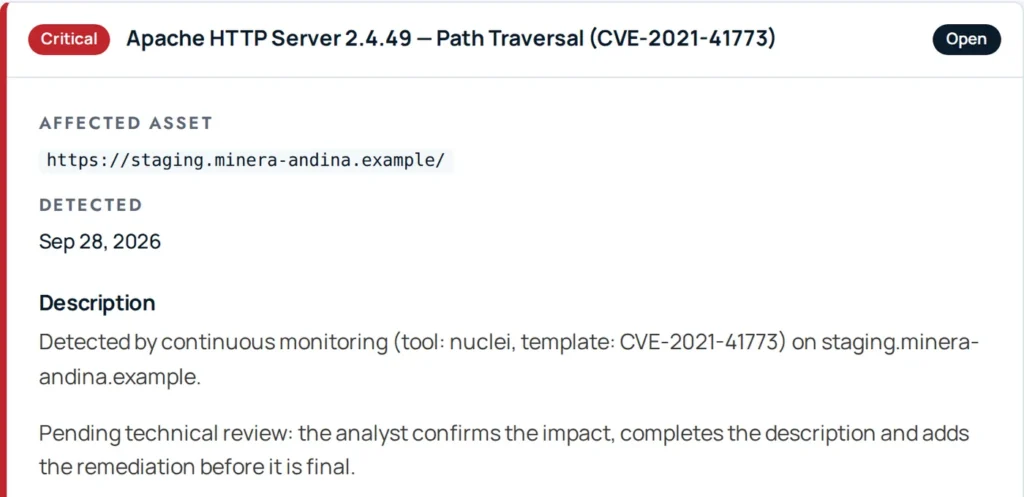
- By default, only what a certified pentester confirmed is published to your portal.
03
Remediation hub
From finding to verified fix, with traceability for your team and your auditors.
- Findings with severity, affected asset and recommendation, visible as soon as they are published.
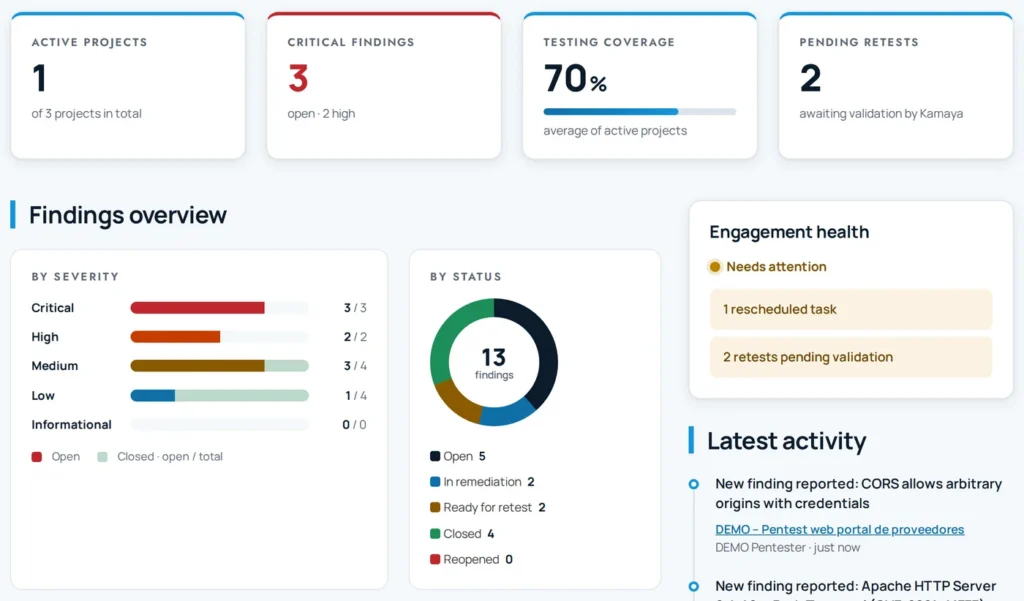
- Your team records the fix and requests a retest; a pentester verifies it and closes the finding.
- Alerts by email, Slack or Jira, without exposing finding details outside the portal.
- Versioned reports and documents, with an integrity check on every download.
How it works
From your approved scope to a confirmed finding
01
Approved scope
You define in writing the domains, subdomains and IP ranges Kynapt may monitor. Nothing outside that scope is tested.
02
Discovery
Kynapt identifies the exposed assets within scope: subdomains, web services, APIs, open ports and technologies with their versions.
03
Authorization
A pentester reviews every discovered asset and authorizes it. Only authorized assets within the current scope enter monitoring.
04
Scheduled testing
Scans run at the agreed frequency, with rate limiting and from Kamaya Secure’s scanning infrastructure.
05
Triage
Triage rules remove duplicates, estimate the confidence of each detection and send everything critical, high or uncertain to human review.
06
Validation and publishing
A pentester confirms the impact, adjusts the severity and publishes the finding to your portal, alerting your team through the channel you chose.
Safeguards
Designed not to put your operations at risk
Continuous monitoring only adds value if it is safe. These rules are built into the platform, not written in a document.
Authorized assets only
Two checks: the asset must be within the current scope and authorized by a pentester. If the scope changes, the authorization no longer applies.
Rate limiting
Every scan has a cap on requests per second, agreed with you so your services are not degraded.
Dry-run mode
Before running, Kynapt can generate the full plan without launching any test, so we can review it with you.
Frequency that fits you
One-off, daily, weekly or monthly, depending on the criticality of each environment and your maintenance windows.
No destructive techniques
Kynapt does not run destructive exploitation or denial-of-service tests. Manual exploitation is done by a pentester, with your authorization.
Confidential evidence
Only metadata is stored for each detection, never full requests or responses. The portal isolates each organization’s information.
What you get
Continuous visibility, in your portal
Alerts by
- Slack
- Jira Cloud
- Monitored inventory: your authorized assets, with their type, criticality and date of last check.
- Validated findings: each with the affected asset, severity and remediation recommendation.
- Built-in retest: your team records the fix and a pentester verifies it before closing the finding.
- Visible cadence: date of the last and next scan for each engagement.
- Traceable history: scans, findings, retests and documents, useful as evidence for ISO 27001, Peru’s SBS Resolution No. 504-2021 or PCI DSS.
- Secure access: portal in Spanish, English or Portuguese, with two-step verification.
FAQ
What people usually ask us about Kynapt
Does Kynapt replace a pentest?
No. Kynapt monitors continuously and detects what can be detected automatically. Business logic flaws, attack chains and access controls require a manual pentest; Kynapt helps you decide where and when to run one.
Can Kynapt affect my systems?
Kynapt works with rate limiting, without destructive techniques and only on authorized assets. OT/ICS networks are not actively scanned. Even so, we agree on windows and frequencies with you for each environment.
What happens to my findings data?
Findings live in your portal, isolated from other organizations. Email, Slack or Jira alerts do not include the title or details: only the severity and a link to the portal.
How often are my assets checked?
As often as we agree: one-off, daily, weekly or monthly. Your portal shows the date of the last and next scan.
Can I get Kynapt without a pentest?
[PLACEHOLDER: confirm Kynapt’s commercial options]

See Kynapt working on your own attack surface
Tell us which domains and environments you want to monitor. We agree on scope, frequency and safeguards with you before the first scan.